
Quick answer
You can automate Meta Ads without losing control by splitting every possible action into three tiers: actions the AI agent can take alone within set limits, actions it must propose for human approval, and actions it can never take. Add budget caps, brand rules and an audit log, and automation handles the repetitive work while people keep the decisions that matter.
Why teams hesitate to automate Meta Ads
Meta Ads rewards speed. Creative fatigues fast, auction prices move daily, and the best-performing ad set this week may be average next week. Keeping up by hand means someone checking Ads Manager several times a day.
Yet most teams are wary of handing that job to software. The concerns are practical. - An automated rule doubles a budget on a weekend spike and burns through the month’s spend.
AI-generated creative goes live with an off-brand claim or a wrong price.
Nobody can explain afterwards why a campaign was paused or restructured.
The answer is not to avoid automation. It is to design where the human sits in the loop.
The three-tier approval model
Before switching on any Meta Ads automation, list every action the system could take and put each into one tier.
| Tier | What it covers | Examples |
|---|---|---|
| Autonomous | Low-risk, reversible actions inside set limits | Pause an ad below a CTR floor; shift up to 15% of budget between ad sets; rotate in pre-approved creative |
| Approval required | Actions that change spend levels, public messaging or structure | Launch a new campaign; publish new creative; raise daily budget above the cap; add a new audience |
| Never | Actions no agent should take | Change billing or payment settings; edit account permissions; exceed the monthly budget |
The percentages above are starting points. Tighten them for new accounts and loosen them as you build trust in the agent’s decisions.
How an approval workflow runs day to day
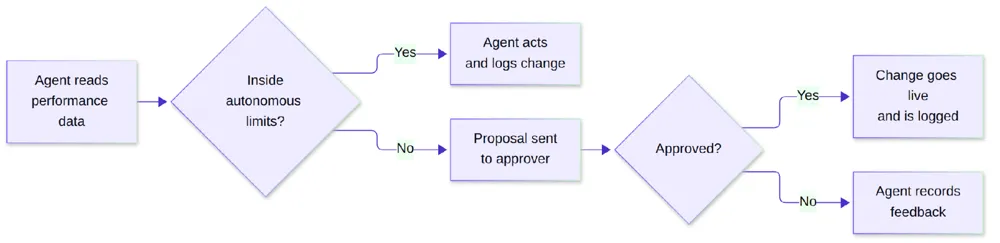
Each proposal should carry its reasoning: what the agent saw, what it wants to change, and what outcome it expects. An approver should be able to say yes or no in under a minute. If they cannot, the proposal needs more context.
Guardrails to set before you start
Budget caps. Set a daily and monthly ceiling per account and per campaign. The agent works inside them, never above.
Brand and claim rules. Define banned words, required disclaimers, price and offer formats, and visual rules. Creative that breaks them should never reach the approval queue.
Change limits. Cap how much any single action can move budget, and how many changes can happen per day.
Named approvers. Decide who approves creative, who approves budget changes, and who covers when they are away.
An audit trail. Record every action with a timestamp, the data behind it and who approved it.
A pause switch. One control that stops all agent activity on an account immediately.
What to automate first
Start with the work that is high-volume and low-risk. - Creative variant production. Let the agent generate headline, copy and image variants, and score them before any go to review.
Fatigue detection. Flag ads whose frequency is climbing while click-through falls.
Budget rebalancing within caps. Move spend toward ad sets returning more per extra dollar.
Daily performance summaries. Replace manual morning checks with a written summary of what changed and why.
Keep new campaign launches and first-time creative in the approval tier for at least the first few weeks.
Measurement matters as much as control
An agent can only optimize toward the conversions it can see. Meta’s Conversions API connects server, website, app and CRM data to Meta so its systems can “optimize ad targeting, decrease cost per result and measure outcomes” (Meta for Developers). If purchases or qualified leads are missing from that data, both the agent and Meta’s own delivery will optimize toward the wrong signal.
How Auroscale handles Meta Ads automation
Auroscale’s AI marketing agent generates and scores ad creative before budget goes behind it. The paid ads agent tracks marginal ROAS and reallocates spend across Meta, Google and LinkedIn.
Approval steps, governance and audit trails sit on top of that agent activity, so your team decides what runs on its own and what waits for sign-off.
FAQ
Can AI fully run my Meta Ads account?
It can run much of the daily optimization. Most teams still keep launches, new creative and large budget changes behind human approval.
How is this different from Meta’s automated rules?
Automated rules apply one condition to one metric. An AI agent weighs several signals together, proposes changes with reasoning, and works across channels, not only Meta.
Will approvals slow everything down?
Not if the tiers are set well. Routine changes happen instantly; only higher-risk actions wait, and each proposal is built to be reviewed quickly.
What happens if an agent makes a bad change?
Every change is logged, reversible actions can be rolled back, and the pause switch stops activity on the account.
Do I need the Conversions API to automate Meta Ads?
It is not strictly required, but complete conversion data makes automated optimization far more accurate.
See the approval flow in action
Book a free Auroscale demo to see how agents propose Meta Ads changes, how approvals work, and how every action is logged.