Quick answer
To connect HubSpot, Salesforce or Shopify to an AI marketing workflow, link each system through its native connector or API, choose which records the agents can read and write, map fields such as email, lifecycle stage and order value, and send outcomes back to your ad platforms. Once connected, AI agents can optimize campaigns on leads, pipeline and revenue instead of clicks.
Why CRM and store data matter to AI agents
Ad platforms only see what happens on their side: impressions, clicks and the conversions their pixel catches. The events that matter to the business happen later, in your CRM or store: a lead becomes an opportunity, a deal closes, a customer buys again.
An AI agent working only with ad platform data will optimize for what it can see. Connecting HubSpot, Salesforce or Shopify lets it optimize for what you are paid for.
What data to pull from each system
| System | Key records | What agents use them for |
|---|---|---|
| HubSpot | Contacts, companies, deals, lifecycle stages, form submissions | Lead quality by campaign, MQL-to-SQL rates, nurture triggers |
| Salesforce | Leads, contacts, accounts, opportunities, stages, amounts | Pipeline and revenue by source, offline conversions for ad platforms |
| Shopify | Orders, line items, products, customers, refunds, inventory | Revenue and margin by campaign, repeat purchase, stock-aware promotion |
Start with the minimum. For most teams that is contact or customer ID, email, phone, source campaign, lifecycle or order status, and value.
How the data flows
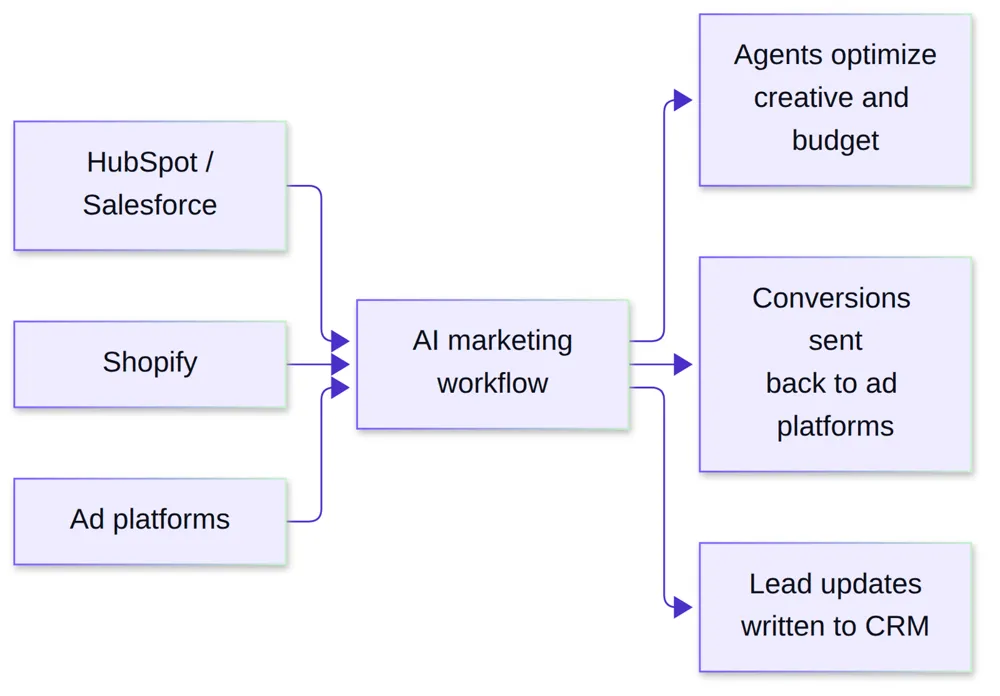
Data moves in both directions. Agents read CRM and store records to judge performance, and write back useful context, such as the campaign and creative a lead came from.
Connection methods
- Native connectors with OAuth. The fastest route. You sign in, grant scoped permissions, and the platform handles authentication and refresh.
- APIs. For custom objects or fields. HubSpot’s current APIs, for example, use date-based versions such as
/crm/objects/2026-09/contacts(HubSpot Developers). - Webhooks. For near-real-time events. Shopify webhooks let apps “receive near-real-time event data” instead of repeatedly polling for changes (Shopify).
- Server-side conversion APIs. To send CRM and store outcomes to Meta, Google and LinkedIn as conversions.
Step-by-step setup
- Decide the source of truth. If you run HubSpot and Salesforce together, pick which one owns lead and opportunity stages.
- Connect with least-privilege access. Grant only the scopes the workflow needs, such as read on deals and write on a few contact fields.
- Map the fields. Match email, phone, lifecycle stage, deal amount and order value to the workflow’s schema. Agree on currency and time zone.
- Standardise campaign tracking. Consistent UTM parameters and click IDs are what tie a CRM record back to an ad.
- Define the conversion events. For example, SQL, opportunity created, closed-won, first purchase, repeat purchase.
- Send outcomes back to ad platforms. Pass those events through each platform’s conversions API so their delivery optimizes on them too.
- Test with real records. Follow ten recent leads or orders end to end and check every field landed correctly.
- Set write-back rules. Decide which fields agents may update in your CRM and log every change.
Common pitfalls
- Duplicate contacts across HubSpot and Salesforce, which inflate lead counts.
- Missing UTMs on forms or checkout, which break attribution.
- Refunds ignored, so Shopify revenue looks higher than it is.
- Over-broad permissions that give the workflow write access it does not need.
- Consent gaps. Only use contact data for advertising where your privacy policy and consent records allow it.
How Auroscale connects your data
Auroscale integrates with HubSpot, Salesforce and Shopify alongside Meta Ads, Google, LinkedIn, TikTok and Slack, with webhooks, OAuth2 and REST or GraphQL APIs for custom setups. Across 200+ integrations, CRM and store data flow into the agents, so the paid ads agent can reallocate budget on marginal ROAS and every follow-up has the right context. See the AI marketing agent for the full picture.
FAQ
Do I need a developer to connect HubSpot, Salesforce or Shopify?
Not for native connectors. Custom objects or unusual field setups may need some API work.
Can I connect HubSpot and Salesforce at the same time?
Yes. Choose one as the source of truth for lead and deal stages to avoid conflicts.
How fresh is the data?
Webhooks deliver events in near real time. Scheduled syncs run on a set interval, often hourly or daily.
Will the AI change records in my CRM?
Only the fields you allow, and every change is logged.
Is customer data sent to ad platforms safe?
Conversion APIs typically require hashed identifiers such as email and phone. Follow each platform’s rules and your own consent policy.
Connect your stack and see it work
Book a free Auroscale demo and we will walk through connecting your CRM or store and what the agents do with the data.